
eSchoolPlus provides a mobile-friendly browser experience that allows students, guardians, and administrators to access supported functionality from a mobile device.
Use a web browser on your mobile device to access eSchoolPlus. The mobile-friendly experience adjusts supported pages and navigation for smaller screens. It is not a separate mobile application.
Note: Pages that are not mobile-ready are not displayed in the navigation menu when you access eSchoolPlus from a mobile device. These pages continue to be available in the desktop experience.
Desktop and mobile browser experience
Some navigation, page layouts, and functionality differ between the desktop and mobile browser experiences.
|
Area |
Desktop experience |
Mobile browser experience |
|---|---|---|
|
Navigation |
Uses the standard desktop navigation. |
Navigation is available from the menu in the upper-right corner. |
|
Course Requests |
Available under Classes in Home Access Center. |
Not displayed in the mobile Home Access Center view. |
|
Current Average |
Displayed in a separate column. |
Displayed with the course information and identified by Current Average. |
|
Wide tables |
Display based on the available desktop width. |
Use horizontal scrolling to view content that extends beyond the available screen width. |
|
Student Summary |
Student information is available through the existing desktop pages and components. |
Related Student Summary information is consolidated instead of being displayed on separate mobile pages. |
|
Attendance |
Uses the existing desktop attendance workflow. |
The Absence link on the Attendance widget opens Attendance Bulletin. |
|
Today's Birthdays |
Existing desktop behavior is unchanged. |
Authorized users can add the Today's Birthdays widget to the home page. |
|
Conduct Referrals |
Existing desktop discipline functionality remains available. |
Authorized staff can use the mobile-friendly Conduct Referrals page. Student photos are not included. |
|
Pages that are not mobile-ready |
Continue to be available in the desktop experience. |
Are not displayed in the mobile navigation menu. |
Home Access Center on a Mobile Device
Home Access Center (HAC) provides a responsive browser experience for students and guardians using mobile devices. Most supported pages retain their existing information while adapting the layout and navigation for smaller screens.
Navigate Home Access Center
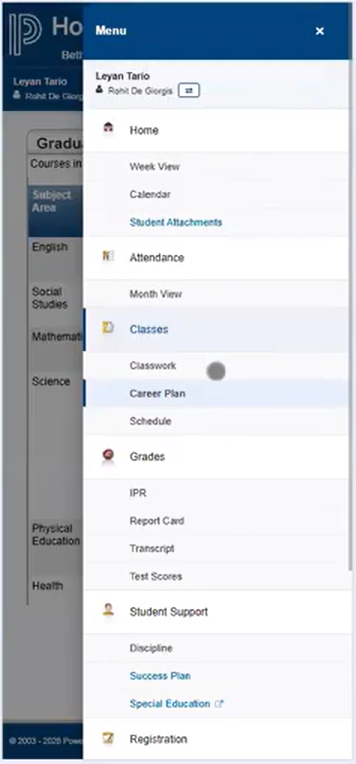
When you access Home Access Center from a mobile device, use the menu in the upper-right corner to navigate between available pages.
-
Open Home Access Center in your mobile browser.
-
Select the menu in the upper-right corner.
-
Select the page you want to open.
The selected page opens using its mobile-responsive layout.
Course Requests
The Course Requests page under Classes is not displayed when you use Home Access Center from a mobile device.
Course Requests continues to be available in the desktop experience.
Current Average
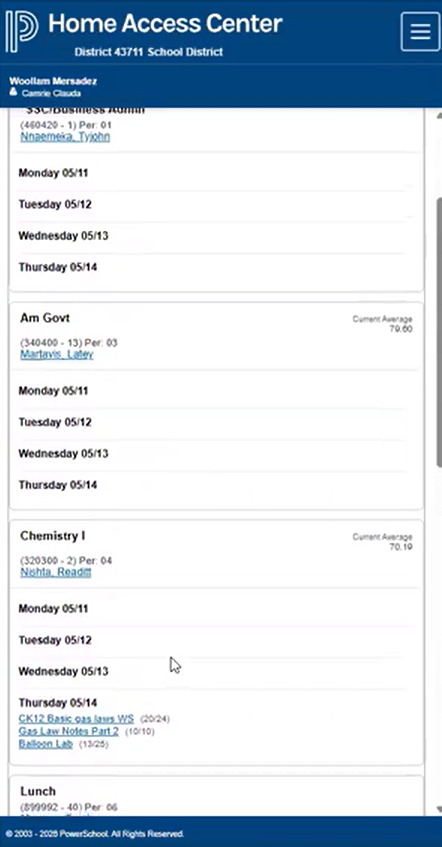
On desktop, Current Average is displayed in a separate table column.
Because of the reduced screen width on mobile devices, Current Average is displayed with the applicable course information and identified by the Current Average label.
For tables containing more information than can fit within the available screen width, use the horizontal scrollbar to view additional content.
Accessibility
The responsive Home Access Center pages are designed to be mobile responsive and WCAG 2.1 compliant.
Prepare Student Information for Use Without Connectivity
The browser-based mobile experience does not provide the cached offline access that was available with the mobile application.
If you anticipate needing student information when you do not have access to eSchoolPlus, generate a Student Quick Reference Report beforehand.
Depending on your permissions and report selections, the report can include:
-
Student information
-
Contact information
-
Phone numbers
-
Email information
-
Authorized medical information
-
Full schedule information
-
Schedule information for a selected date
Generate a Student Quick Reference Report
From the main menu, select: Registration – Entry & Reports – Reports – Student Quick Reference.
You can build the student list using Activity, Class, or Criteria.
You can also generate the report for an individual student. From the student's Student Summary page, select Print Quick Reference from the page options.
After you schedule the report, retrieve the generated PDF from Tasks and Reports.
Important: Student Quick Reference reports may contain confidential student information. Store downloaded and printed copies securely and verify time-sensitive information before using the report.
Mobile Page Availability
Not all eSchoolPlus pages are available in the mobile-friendly browser experience.
When you access eSchoolPlus using a mobile device:
-
Mobile-responsive pages are available from the navigation menu.
-
Pages that are not mobile-ready are not displayed in the mobile navigation.
-
Non-mobile-ready pages continue to be available in the desktop experience.
-
If a non-mobile-ready page is accessed through a mobile browser, the existing invalid-browser-width behavior applies.