
Assessment Fact
-
16 new subtests will be added for Career and Technical Education
|
Name |
Description |
Subject Area |
Code |
|---|---|---|---|
|
SkillsUSA - Advertising Design |
SkillsUSA - Advertising Design |
Career Education |
00C15 |
|
NOCTI - Collision Repair |
NOCTI - Collision Repair |
Career Education |
00C16 |
|
NOCTI - Commercial Foods |
NOCTI - Commercial Foods |
Career Education |
00C17 |
|
NOCTI - Computer Aided Drawing |
NOCTI - Computer Aided Drawing |
Career Education |
00C18 |
|
NOCTI - Conservation |
NOCTI - Conservation |
Career Education |
00C19 |
|
SkillsUSA - Criminal Justice – CSI |
SkillsUSA - Criminal Justice – CSI |
Career Education |
00C20 |
|
NOCTI - Criminal Justice |
NOCTI - Criminal Justice |
Career Education |
00C21 |
|
NOCTI - Early Childhood Ed&Care – Basic |
NOCTI - Early Childhood Ed&Care – Basic |
Career Education |
00C22 |
|
SkillsUSA - Electrical Construction Wiring |
SkillsUSA - Electrical Construction Wiring |
Career Education |
00C23 |
|
NOCTI - Medical Assisting |
NOCTI - Medical Assisting |
Career Education |
00C24 |
|
NOCTI - Precision Machining |
NOCTI - Precision Machining |
Career Education |
00C25 |
|
NOCTI - Pre-engineering |
NOCTI - Pre-engineering |
Career Education |
00C26 |
|
MSSC - Cert Production Tech Seq |
MSSC - Cert Production Tech Seq |
Career Education |
00C27 |
|
NOCTI - Small Engine Tech |
NOCTI - Small Engine Tech |
Career Education |
00C28 |
|
NOCTI - Television Production |
NOCTI - Television Production |
Career Education |
00C29 |
|
NOCTI - Welding |
NOCTI - Welding |
Career Education |
00C30 |
Staff Snapshot
-
Field 56, Itinerant Teacher, and field 76, Email (Work), are now populate
-
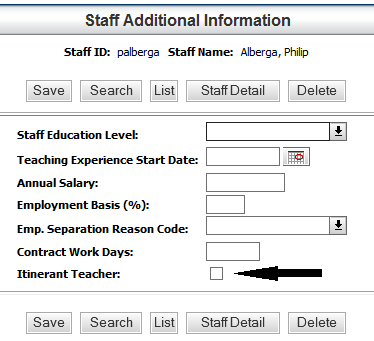
Itinerant Teacher
-
Administration > Registration Setup > Building > Staff> District-Defined > Staff Additional Information
-
A new field, Itinerant Teacher, has been added. When checked, a 'Y' will be entered into Field 56 – Itinerant Teacher.
-
-
-
Email (work)
-
This value will be populated from the Administration > Registration Setup > Building > Staff> General Information > Email Addresses field.
-